Auduo

Auduo

Your Mac, playing through two speakers at once.

Headphones for you, the living room speaker for everyone else. Or AirPods and a USB DAC. Pick two outputs, press one button, and they both play.

Version 1.0.0 · macOS 14 or later · Apple silicon and Intel · Free

The App Store version updates itself and is where Auduo Pro is sold. The disk image is signed with a Developer ID and notarised by Apple, so it opens on the first try.

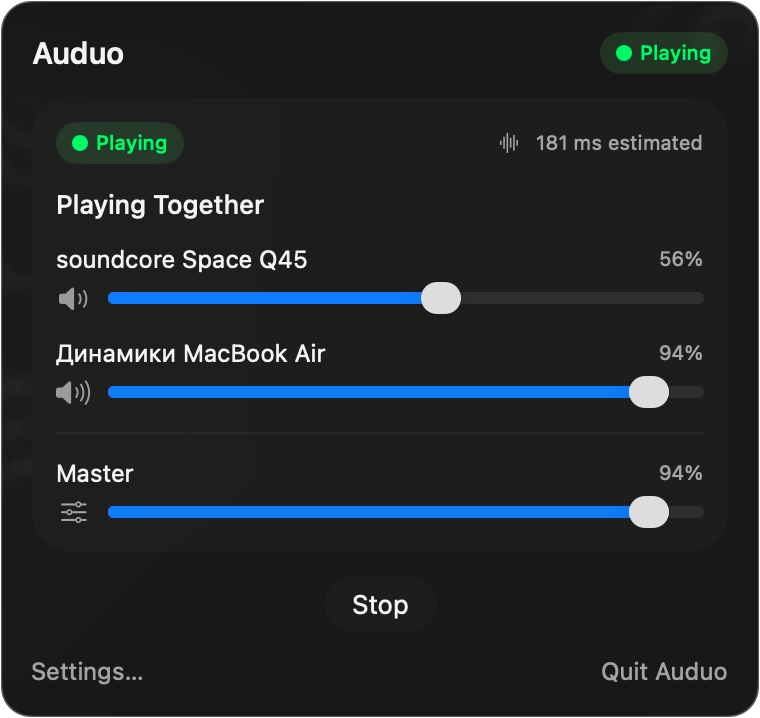
The Auduo popover playing through soundcore Space Q45 and the MacBook Air speakers, each with its own volume slider

macOS can already do this. It just makes you work for it.

Open Audio MIDI Setup. Build a Multi-Output Device. Switch your system output over to it. Then remember to switch it back. Auduo is that, without the ceremony.

  1. Click the menu bar icon

    It lives up there next to the Wi-Fi. No Dock icon, no window to keep track of.

  2. Pick two outputs

    Whatever your Mac can see right now, including the speaker that just woke up.

  3. Press Play Together

    Spotify, YouTube, Safari, games, notification sounds. All of it, on both.

  4. Press Stop when you're done

    Your old output comes back on its own. Auduo cleans up after itself.

The annoying parts, handled

Bluetooth speakers wander out of range. Two devices refuse to agree on a sample rate. Clocks drift and your speakers slowly stop lining up. That's what Auduo spends its time on.

Bluetooth, USB, HDMI, whatever

If Core Audio can see the device, Auduo can use it. AirPlay and virtual devices included.

One speaker too loud?

Every output gets its own slider and mute button, driving the device's real volume control. The master slider moves both and keeps the balance you set.

It cleans up after itself

Stop it, quit it, close the lid, crash it. Your old output comes back either way, even if the crash happened yesterday.

When a speaker wanders off

Sound keeps playing on the one that's left. Whether Auduo reconnects, stops, or asks you first is up to you.

Sample rates, sorted

It finds a rate both devices actually support and prefers 48 kHz. If there isn't one, it tells you instead of quietly sounding wrong.

No slow drift apart

Everything that isn't the clock master gets drift correction, so two speakers still line up an hour later.
Written for the Mac, not ported to it

SwiftUI and Core Audio, nothing else. Liquid Glass on macOS 26 and the matching materials on Sonoma and Sequoia. It respects Dark Mode, Reduce Transparency and Reduce Motion, because those settings exist for a reason. Launch at login if you want it, and a Dock icon if you miss having one.